
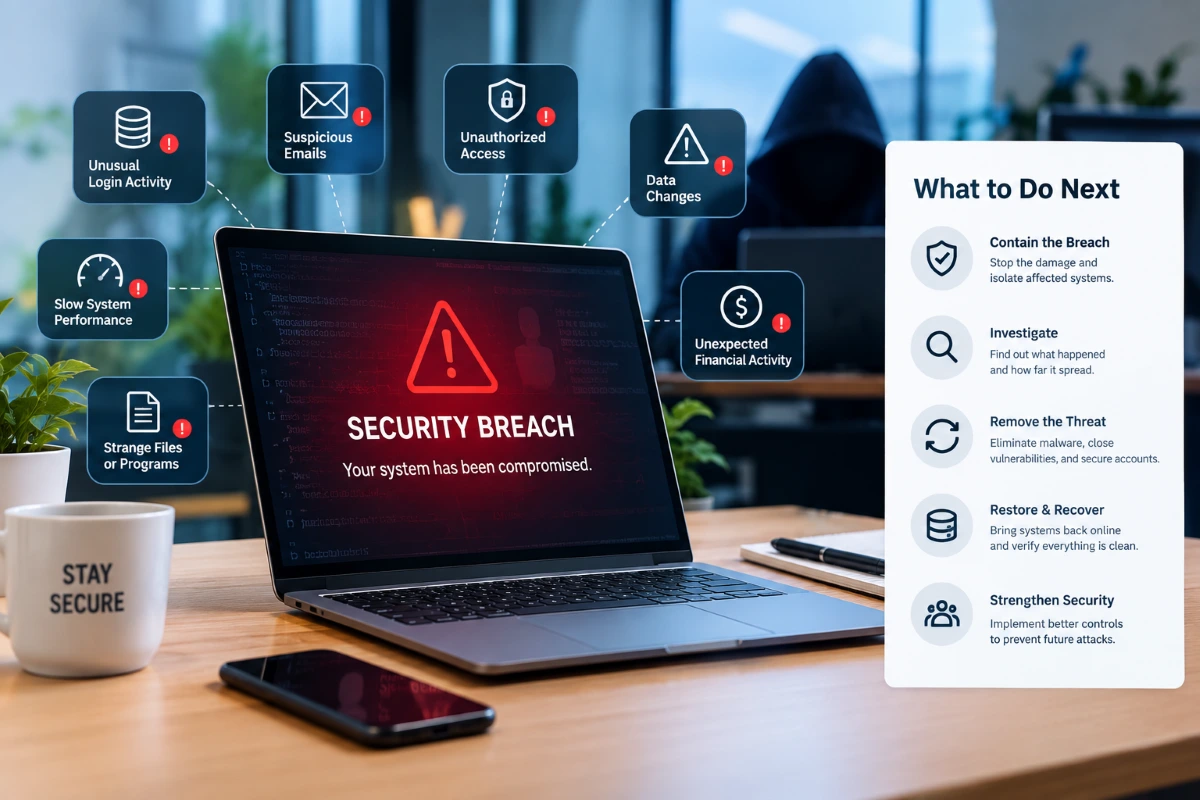
7 Signs Your Business Has Been Breached and What to Do Next
A cyber breach does not always come with a clear warning. You may not see a ransom message, a locked computer or another obvious sign that an attacker has entered your business. In some cases, suspicious activity can continue for days or even longer before anyone notices.
That is why recognising the warning signs matters.
An attacker may gain access to email accounts, cloud platforms, business files, customer information, devices or internal systems. They could use stolen credentials, phishing, malware, an unpatched vulnerability or another security weakness to gain that access.
The sooner a business spots unusual activity, the sooner it can investigate the situation and take steps to limit potential damage.
For Australian businesses, a cyber incident can cause more than technical problems. It may interrupt normal operations, expose sensitive information, create financial losses and damage customer trust.
At the same time, unusual activity does not automatically mean someone has breached the business. Technical problems, incorrect settings and legitimate logins from unfamiliar locations can sometimes appear suspicious.
The key is to investigate activity that does not match normal business behaviour instead of ignoring it.
What Does a Business Breach Mean?
A business breach occurs when an unauthorised person gains access to systems, accounts, devices, networks or information.
An attacker may use stolen credentials or exploit a weakness in the business environment. They might also install malicious software or use a legitimate account to move through systems without immediately attracting attention.
If an attacker breaches a business, they may gain access to more than the original account or device that allowed them to enter.
For example, a stolen email password could provide access to:
- Business emails
- Customer information
- Shared documents
- Cloud storage
- Password reset links
- Financial correspondence
- Internal communications
- Other connected applications
This is why businesses need to look beyond the first affected computer or account.
A breach does not always involve stolen data either. An attacker may initially gain access and spend time identifying valuable systems or information before taking further action.
7 Signs Your Business Has Been Breached
There is no single symptom that confirms an attack. Several warning signs appearing together, however, should receive immediate attention.
1. Unusual Login Activity
Unexpected login activity is one of the first things businesses should investigate.
Employees may receive notifications about successful sign-ins from unfamiliar locations or devices. There may also be repeated failed login attempts followed by a successful sign-in.
Other warning signs include:
- Logins at unusual times
- Sign-ins from unfamiliar countries
- Unknown devices accessing accounts
- Unexpected password reset requests
- Changes to MFA settings
- New recovery email addresses or phone numbers
- Unusual administrator activity
A single unfamiliar login does not necessarily mean a business has been breached. Employees can travel, work remotely or use mobile networks that make their location appear different.
The concern becomes stronger when the login does not match the employee’s normal behaviour and nobody can explain it.
Cloud platforms should therefore be monitored rather than relying only on employees to report suspicious activity.
2. Passwords Suddenly Stop Working
An employee may suddenly find that their password no longer works even though they did not change it.
There are legitimate reasons for password changes, but an unexplained change can indicate that someone else has accessed the account.
Attackers sometimes change passwords after obtaining access so the legitimate user cannot easily regain control.
They may also change:
- Recovery information
- MFA methods
- Account permissions
- Email forwarding rules
- Connected applications
- Administrator settings
If a business has been breached, simply resetting one password may not solve the problem.
The account history should be reviewed to determine whether an unauthorised person accessed it before the password changed.
3. Strange Emails Are Sent From a Business Account
A compromised email account can be particularly dangerous because attackers can use legitimate business communication to deceive other people.
Customers, suppliers or employees may receive messages that appear to come from someone they normally trust.
Look for:
- Emails nobody remembers sending
- Unexpected invoice requests
- Requests to change bank details
- Suspicious attachments
- Unusual links
- Password reset messages
- Messages sent at unusual times
- Unexpected mailbox rules
- Automatic forwarding to unknown addresses
A compromised mailbox can allow an attacker to monitor conversations and wait for an opportunity to impersonate an employee.
For example, they might watch a conversation about a supplier payment and later send a convincing message requesting that the payment be redirected.
This type of business email compromise can cause financial damage even when the attacker never installs malware on a computer.
4. Files Disappear, Change or Become Encrypted
Unexpected file changes should always raise concerns.
Employees may suddenly find that documents have disappeared, moved, changed names or become inaccessible.
During a ransomware attack, criminals may encrypt files and display a ransom demand.
However, a missing or inaccessible file does not automatically mean someone has breached the business. Accidental deletion, synchronisation problems and software errors can cause similar issues.
The scale and timing of the changes can provide important clues.
If hundreds or thousands of files change within a short period, especially across multiple computers or shared storage locations, treat the situation as urgent.
Avoid deleting suspicious files or rebuilding affected computers straight away unless your incident response process requires it. Preserving evidence can help security teams understand what happened and determine how far the incident spread.
Backups also play a critical role. Businesses need to know whether clean copies of important data exist and whether they can successfully restore those backups when needed.
5. Computers Suddenly Behave Differently
A computer becoming slow does not automatically indicate a cyber attack.
Hardware problems, software updates and storage issues can all affect performance.
However, unusual behaviour becomes more concerning when it appears suddenly or affects several devices.
Warning signs can include:
- Unexplained pop-ups
- Unknown applications
- Browser settings changing
- Security software being disabled
- Applications opening without user input
- High CPU or network activity
- Frequent crashes
- Unknown processes running in the background
If a business has been breached, these changes may indicate malicious software or unauthorised activity.
The safest approach is to investigate the cause rather than assuming the problem is simply an ageing computer.
6. Security Alerts Keep Appearing
Security tools can detect suspicious activity, but alerts only help when someone investigates them.
Repeated warnings about malware, suspicious logins, blocked connections or unusual applications should never be ignored.
A business may already use endpoint protection, email filtering and network security. These controls provide important protection, but they still need regular monitoring.
For example, several failed login attempts followed by a successful sign-in could indicate an account attack. Repeated connections to an unfamiliar destination may also warrant further investigation.
Businesses that want to strengthen this area can consider Security Solutions that support broader protection across systems and business technology.
If a business has been breached, security alerts can also help establish when suspicious activity started and identify the systems involved.
7. Employees Notice Something Unusual
Employees often spot small changes before management or automated systems identify the wider problem.
Someone may report:
- An email they did not send
- An unexpected MFA request
- A login notification they do not recognise
- A strange pop-up
- A new browser extension
- A file they cannot access
- Unusual messages from a colleague
- A computer behaving differently
These reports should be taken seriously.
Employees should know exactly who to contact when something looks suspicious. A simple reporting process can help the business investigate potential incidents before they become more serious.
If a business has been breached, early reports from staff can sometimes provide important clues about the initial point of access.
What Should You Do If You Suspect a Breach?
Discovering suspicious activity can be stressful, but a calm and controlled response is more effective than making several changes without understanding what happened.
If you suspect your business has been breached, work through the following steps to assess the situation, contain the threat and protect your systems.
1. Take the Warning Seriously
Do not assume that the problem will disappear.
Record what happened, when it happened and which users, devices or systems appear to be affected.
Employees should avoid making unnecessary changes until the situation has been assessed.
2. Isolate Affected Devices When Appropriate
If malware appears to be spreading, disconnecting an affected device from the network may help limit further communication.
However, do not automatically switch off every computer or server.
Some incidents require logs and other evidence to remain available for investigation. The correct containment approach depends on the type of incident.
3. Secure Compromised Accounts
Use a trusted device to change the password of a compromised account.
Review:
- MFA settings
- Active sessions
- Recovery information
- Email forwarding rules
- Connected applications
- Account permissions
If the same password was used elsewhere, those accounts should also be secured.
4. Identify What Was Accessible
Determine which systems the affected user or device could access.
Consider:
- Microsoft 365
- Cloud storage
- Customer databases
- Accounting platforms
- Shared drives
- Remote access systems
- Internal applications
- Administrative systems
This helps establish the potential scope of the incident.
5. Preserve Useful Evidence
Keep relevant logs, security alerts, suspicious emails and screenshots.
Record usernames, devices, times and other details that could help explain the incident.
Avoid randomly deleting files or reinstalling systems before the situation has been assessed.
6. Check Your Backups
If files have been deleted or encrypted, identify available backups.
Do not assume that every backup is safe.
Attackers may attempt to access or damage backup systems during a ransomware attack. A business should therefore verify that backups remain intact and can be restored.
Testing recovery before an incident occurs is much safer than discovering during an emergency that a backup does not work.
7. Get Professional Assistance
A serious security incident can affect multiple systems at once.
An attacker may move from an email account to cloud storage, endpoints or other applications. Tracing the full attack path can therefore require specialist knowledge and experience.
Professional assistance can help businesses determine:
- How the incident started
- Which systems the attacker accessed
- Whether the attacker still has access
- What information they may have exposed
- Which vulnerabilities need attention
- How to safely restore affected systems
For businesses that need ongoing technical monitoring and support, Managed IT Services can provide a more proactive approach to managing business technology.
What Not to Do After a Suspected Breach
A rushed response can sometimes make the situation worse.
Avoid:
- Ignoring suspicious login activity
- Continuing to use a compromised account
- Deleting evidence before investigating the incident
- Reinstalling affected computers without understanding what happened
- Assuming one infected computer represents the full extent of the problem
- Restoring backups before investigating the incident
- Making random configuration changes
- Asking employees to handle technical investigations themselves
- Treating the incident like an ordinary computer problem
If a business has been breached, focus on containment, investigation and recovery rather than simply getting one computer working again.
A documented incident response process can help everyone understand their responsibilities and follow the right steps when a security incident occurs.
How Can Businesses Reduce the Risk of Another Breach?
There is no security setup that can guarantee a business will never experience an attack.
The practical goal is to make common attacks harder, detect suspicious activity sooner and reduce the impact when something goes wrong.
Strengthen Account Security
Use multi-factor authentication (MFA) for important accounts, particularly email, administrator accounts and cloud services.
Review user permissions regularly and make sure each employee has only the access they need to perform their role.
When an employee leaves the business, disable their accounts promptly to prevent former users from accessing company systems and information.
Keep Systems Updated
Outdated software can contain security vulnerabilities that attackers may exploit.
Regular patching should cover:
- Operating systems
- Business applications
- Browsers
- Servers
- Network equipment
- Security software
Devices that repeatedly fail to install important updates should be investigated rather than left behind.
Improve Email Security
Phishing remains a major risk for Australian businesses.
Email filtering can reduce the number of malicious messages that reach employees, but practical staff training remains just as important.
Employees should know how to spot unusual requests and where to report suspicious emails.
For example, staff should independently verify any request to change a supplier’s bank details rather than approving it simply because the email appears to come from a familiar address.
Protect and Test Backups
Backups should be protected from the same threats that affect production systems.
Consider:
- Where backups are stored
- Who can access them
- How often they run
- How long data is retained
- How quickly systems need to be restored
Most importantly, test restoration.
A backup that has never been tested should not automatically be considered a reliable recovery plan.
Follow a Recognised Security Framework
Australian businesses can use the Essential Eight as a practical starting point for improving cyber security.
The framework addresses areas such as application control, patching, multi-factor authentication, restricting administrative privileges and backups.
It provides a structured baseline that businesses can adapt to their own environment.
The framework becomes most effective when its recommendations translate into actual policies, technical controls and regular reviews.
Monitor Business Systems
Prevention is only one part of cybersecurity.
Businesses also need visibility across accounts, endpoints, networks and cloud services.
Ongoing monitoring can help teams spot unusual behaviour earlier and respond before an incident causes greater disruption.
This becomes especially important for businesses with remote workers, cloud applications, multiple locations or a growing number of connected devices.
Why Can a Breach Be Difficult to Detect?
Cyber attacks are not always obvious.
A ransomware attack can cause immediate disruption, but a stolen password may go unnoticed for much longer.
An attacker could access an email account, read conversations, collect information and wait for the right opportunity without making any obvious changes.
They may also use legitimate login credentials instead of installing malware that triggers security alerts.
For this reason, businesses cannot rely only on antivirus warnings or visible signs of damage.
Security teams need to review account activity, access permissions, endpoint behaviour, network traffic and cloud activity to identify unusual patterns.
For example, a laptop may appear completely normal even though someone has already compromised the employee’s cloud account.
When a business suspects a breach, it should investigate the wider environment rather than focusing only on the device where the issue first appeared.
What Happens After a Breach?
Recovery involves more than restoring access to a computer.
After containing the immediate threat, the business should investigate how the attacker gained access and identify the weaknesses that allowed the incident to occur.
Ask:
- How did the attacker gain initial access?
- Which account or device did the attacker compromise?
- How long did the attacker have access to the environment?
- Which systems could the attacker reach?
- What information could the attacker access?
- Which security controls detected the activity?
- Which controls did not work effectively or were missing?
- Could the business access and restore its backups?
- What changes should the business make to reduce future risk?
The answers can uncover wider security weaknesses.
For example, a phishing attack may initially look like an isolated employee mistake. However, a deeper investigation may show that the business had not enabled MFA, had given users excessive permissions or had failed to monitor suspicious login alerts.
Addressing these wider weaknesses provides stronger protection than simply resetting one password.
Common Cybersecurity Mistakes Businesses Make
Expensive technology does not always prevent security problems.
In many cases, overlooked processes create the biggest weaknesses.
Common mistakes include:
- Sharing administrator credentials
- Using weak or reused passwords
- Leaving former employee accounts active
- Delaying security updates
- Giving users more access than they need
- Failing to test backups
- Ignoring unusual login notifications
- Allowing unnecessary remote access
- Relying on antivirus software alone
- Assuming cloud platforms automatically protect all business data
Another common mistake involves treating security products as set-and-forget solutions.
Security tools can generate alerts, but staff still need to review important warnings and take appropriate action.
If a business has suffered a breach, these overlooked processes can make it harder to identify how the attacker gained access and stop a similar incident from happening again.
When Should a Business Review Its Cybersecurity?
A security review should not wait until something goes wrong.
It is particularly useful when:
- The business has grown
- New employees have joined
- Remote work has expanded
- New cloud applications have been introduced
- Systems have moved to the cloud
- A major software migration has occurred
- A privileged employee has left
- A new network or server environment has been introduced
- The business handles more sensitive information
- Security alerts have become more frequent
Technology changes quickly.
A security approach that worked for a small business several years ago may not provide enough protection after the business adds more users, applications, locations and connected devices.
Regular reviews help keep security controls aligned with the current environment.
Frequently Asked Questions
1. What is the first sign of a business breach?
Unusual login activity, unexpected password changes, suspicious emails and unexplained system behaviour can all indicate a possible breach.
2. Can a business be breached without knowing?
Yes. Attackers can use stolen credentials or other techniques to access systems without immediately disrupting normal business operations.
3. What should I do if an employee account is compromised?
Secure the account, change the password, review MFA and account activity, check connected systems and seek professional technical assistance where necessary.
4. Does antivirus prevent every cyber attack?
No. Antivirus is one layer of protection. Businesses also need MFA, patching, access controls, backups, email security and monitoring.
5. How can Australian businesses improve cybersecurity?
Businesses can start with strong authentication, regular patching, reliable backups, appropriate access controls, employee awareness and a structured framework such as the Essential Eight.
Final Thoughts
A business breach does not always become obvious straight away. Unusual logins, suspicious emails, unexpected password changes and strange device behaviour can all indicate that something is wrong.
Acting quickly can help contain the issue, protect important information and reduce disruption to your business. After an incident, reviewing your security can also help identify weaknesses and reduce the risk of similar problems in the future.
If you are concerned that your business has been breached or want to strengthen your business cybersecurity, expert support can help identify potential risks and put practical security measures in place.